You already did
the hard part.
A collection worth reading is the difficult, unglamorous half of a newsletter, and you have been doing it for months.
Kyurations turns any published collection into a newsletter. What you save between issues becomes the issue: up to five items, composed and laid out, mailed to subscribers every week, fortnight or four weeks. You do not write it, and you do not press send.
Finding the things was the hard part, and you already did it
Anyone who saves seriously ends up with the raw material of a very good publication and no publication. The reading is done. The judgement is done. What is missing is the half-hour every fortnight to write it up, and that half-hour is where almost every personal newsletter quietly dies.
Live lists remove that half-hour rather than help you find it. You keep saving the way you already do. When an issue comes due, what you have added since the last one is composed into it and sent. There is nothing to draft, nothing to schedule, and no send button.
An issue, taken apart
This is not a mockup. It was rendered by the same function that sends the real ones, from a real published collection, which is why the thumbnails are somebody’s actual saved posts.

- 1
Your masthead
The list's name, your handle and the date. Readers subscribed to your taste, so the issue is presented as yours rather than as ours.
- 2
An opening, written for this issue
A short paragraph on what is in this one, composed from the items themselves. It is the difference between a newsletter and a notification.
- 3
The lead
The newest thing runs first, at full width, with its cover and a line on why it is worth your evening. Video gets a play mark that opens at the source.
- 4
The briefs
Everything else follows as short entries with square thumbnails, sized and cropped so the issue keeps its rhythm whatever shape the covers are.
- 5
The way out
One click, from any mail client, no login and no confirmation screen. Easy to leave is what keeps a list full of people who want to be on it.
A minute of work, once
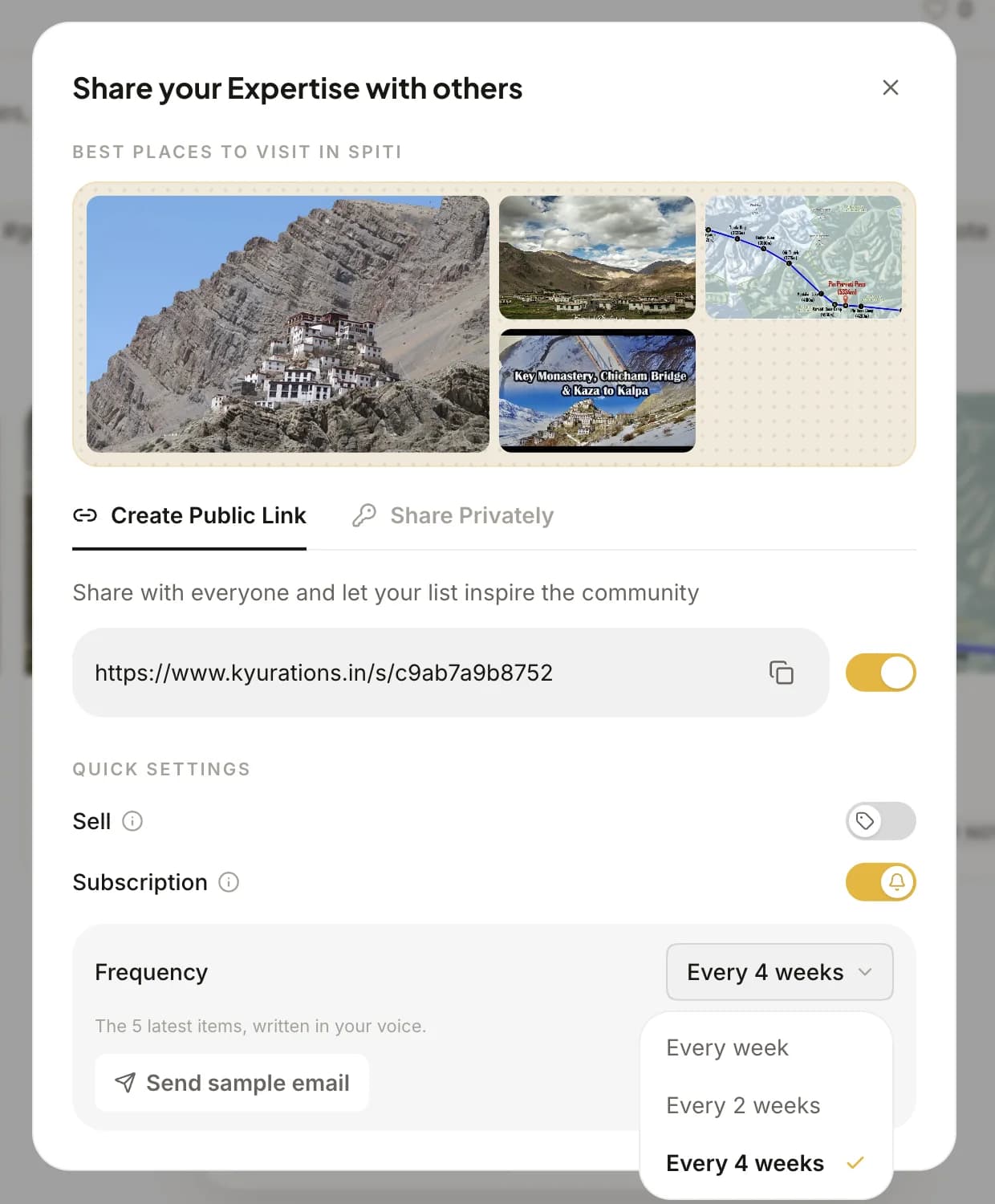
Everything lives in the share dialog you already use to publish a list. There is no separate newsletter section, no sender to verify and no domain to configure.
- 01
Publish the list
A newsletter runs on top of a public collection, so give the list a public link first.
- 02
Turn on Subscription
A switch in the same share dialog, under Quick settings. A Subscribe button appears on the list's public page the moment it is on.
- 03
Pick a cadence
Every week, every two weeks, or every four. Two weeks is the default because it is the one most people can keep.
- 04
Send yourself a sample
It goes to your own account email and it is exactly what a subscriber receives. Worth doing once before anyone else is on the list.
Three clocks. Pick the one you can keep
The one decision worth thinking about for a minute. Match it to how much you already save, and the issues write themselves from there.
Weekly
For someone saving most days, where a fortnight would mean leaving good things out of the issue entirely. The most momentum, and the most to say each time.
Fortnightly
The default, and the right answer for almost everyone. Long enough that five genuinely good things have accumulated, short enough to stay a habit.
Monthly
For a narrow subject you read deeply but not often, or a collection you add to in bursts. Every issue arrives with a month of judgement behind it.
What happens while you are not looking
The part no interface shows you, and the reason an issue arrives looking considered rather than automated.
- An issue is at most five items
- Everything you added since the last issue leads it, newest first. Five is a size somebody reads on a phone in a queue, which is where this is read.
- A thin fortnight is topped up
- If fewer than five things are new, the issue is filled out with the most recent older members of the list, so every issue arrives at a proper size rather than tailing off in a slow fortnight.
- Nothing new means nothing sent
- If you added nothing at all, the issue is skipped and the cadence carries on to the next one. Readers only hear from you when there is something to hear about, which is what keeps them opening it.
- The words are composed, not templated
- The opening paragraph and the line under the lead are written for that issue from the items in it. They are not a mail-merge of your list's description.
- The sending is handled
- No domain to verify, no DNS records, no sending reputation to warm up. Turn it on and the first issue goes out on schedule.
You are probably already most of the way there
The people this works best for are not the ones planning a publication. They are the ones who have been quietly building the material for one and had not thought of it that way.
You already save constantly and have nothing to show for it beyond a private pile.
You want the smallest possible commitment: no drafting, no scheduling, no send button to forget.
You would rather publish something honest every fortnight than something ambitious never.
You are selling a collection and want buyers to keep hearing from it as it grows.
You have taste in a specific corner of the web and a handful of people who keep asking what you are reading.
You want the writing, the layout and the sending to be somebody else's problem.
A Live list keeps score
Once a list is mailing it shows subscribers, views, likes, how many items it holds and when the next issue is due. It is the only per-list panel of numbers in the product, and it appears here because a list with readers is the only kind where the numbers mean anything.
Leaving is one click
Every issue carries a one-click unsubscribe that works from any mail client, with no login and no are-you-sure. Making it hard to leave is how a list fills up with people who resent it.
Sharing, in the guideQuestions people ask
If one is missing, the guide covers sharing in full, and there is a feedback item in the account menu that reaches the person who builds this.
- Who receives an issue?
- Everyone who subscribed to that list from its public page. Subscribing uses the verified email already on their Kyurations account, the way following a channel does, so there is no form to fill in and no address to confirm.
- What exactly is in an issue?
- Up to five items. Everything added since the last issue leads, newest first. If fewer than five are new, the issue is filled out with the most recent older members of the list, so every issue arrives at a proper size.
- What happens if I save nothing that fortnight?
- Nothing is sent and the cadence carries on to the next issue. A quiet fortnight stays quiet, which is what keeps people opening the ones that do arrive.
- Who writes the words around the links?
- The opening paragraph and the line under the lead are composed for that issue from the items in it. Your own notes on an item are used as written, so where you had something to say, that is what readers get.
- Can I change the cadence later?
- Yes, and it re-spaces the next issue rather than sending one immediately. Turning it off stops the mail without touching the list, the public link, or the subscribers.
- How do people unsubscribe?
- One click in the footer of any issue. It works from any mail client with no login and no confirmation step.
- Can I sell a list and mail it too?
- Yes. They are separate switches on the same public list, so a paid collection keeps mailing its buyers as it grows. That is one of the better arguments for buying it in the first place.
- Do I need to set up a sending domain?
- No. There is nothing to verify, no DNS records to add and no sending reputation to warm up. Turn the switch on and the first issue goes out on schedule.
- How many subscribers can a list have?
- There is no cap, and no pricing tier that changes at a threshold.
- What does it cost?
- Nothing. Publishing a collection, running it as a newsletter and the mail itself are all free. The only money Kyurations takes is a share of a sale, if you choose to sell a collection.
Start with the collection.
A newsletter is only worth sending if what is behind it is worth reading, so the first step is not this feature. It is saving nine things you would stand behind.